

Manage subcategories
Merchants group similar items into categories and manage these through their Clover Merchant Dashboard and on their Clover devices. For example, in a restaurant, a merchant can create categories for Salads and Beverages. In the Clover Register app, merchants can view the categories and all items under those categories.
Merchants can optionally add subcategories to a category. They can assign or move items from a category to subcategories, and also manage subcategories on the Category detail page on the Merchant Dashboard. For example:
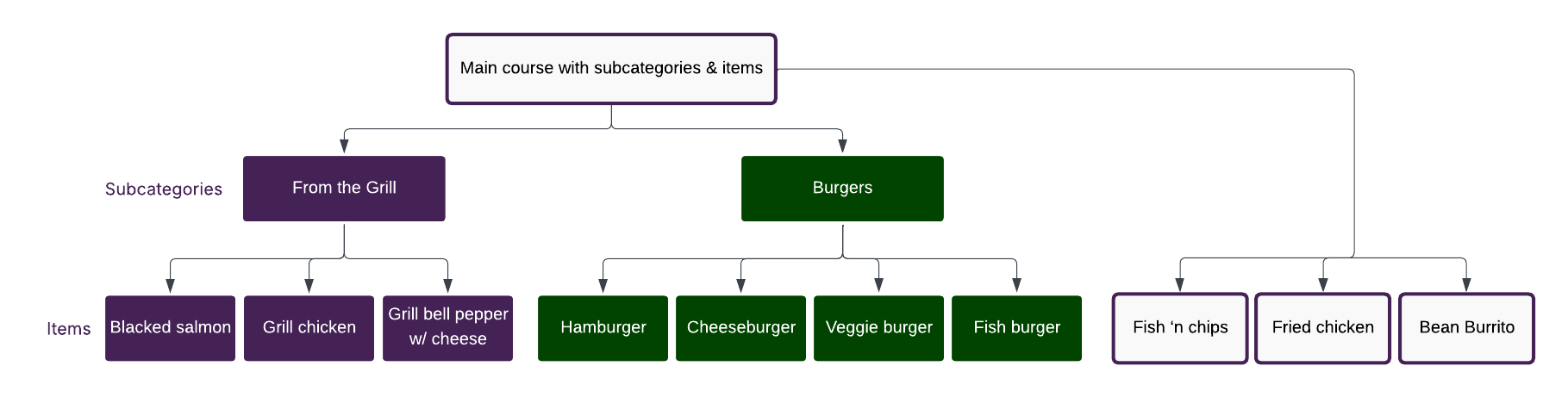
Category, subcategories, and items within the category and the subcategory
Before you begin
| Key points to note about adding and managing subcategories are: | |
|---|---|
| Parent category and subcategory | A subcategory is optional and can only be created within a specific parent category. A parent category can have a maximum of 50 subcategories. A subcategory inherits the parent category's hex color code when defined. |
| Item and subcategory | An item can belong to both a category and its subcategories. You can create a new item to add to a subcategory or assign an item from the parent category to the subcategory. A subcategory can have a maximum of 4000 items. The default sort order for items and subcategories within a category is alphabetical: A to Z Subcategories are deleted when the parent category is deleted. When you delete a subcategory, all items assigned to it are reassigned to the parent category. |
Manage subcategories on the Merchant Dashboard
Merchants can manage subcategories on the Merchant Dashboard. See Clover Help to Work with subcategories.
Manage subcategories with Clover REST APIs
Prerequisite
Create merchant-specific API token in sandbox.
Create a subcategory
- Send a POST request to
/v3/merchants/{mId}/categories/{categoryId}/sub_categories. - Enter required information—
mId,categoryIdandnamefor the subcategory. - Set the Authorization header as Bearer token type, and enter the test API token.
In response, a unique subcategory id is generated, and the subcategory is placed within the parent category. By default, the sortOrder value is set as the last category in the Clover Register and Dining apps. For example, if you already have five subcategories, the new subcategory is sixth in the sort order.
Request and Response example—Create a subcategory
curl --request POST \
--url 'https://apisandbox.dev.clover.com/v3/merchants/{mId}/categories/{categoryId}/sub_categories' \
  --header 'Content-Type: application/json' \
  --header 'Authorization: Bearer {access_token}' \
  --data '{"name": "Greek Salad"}'
{
"id": "86ZQYVJNF4WN0", //subcategory ID
"name": "Greek Salad",
"sortOrder": 1,
"parentCategory": {
"id": "QSNXTBRZNBMAY" //category ID
},
"deleted": false
}Manage items in a subcategory
Merchants can assign existing items in a category to a subcategory or create new items and add them to subcategories. When an item is moved from a parent category to a subcategory, its association with the parent category is removed, and it becomes associated with the subcategory.
Add items to a subcategory
- Send a POST request to
/v3/merchants/{mId}/category_items. - Enter required information—
mId, categoryidand itemid. - Set the Authorization header as Bearer token type, and enter the test API token.
Request and Response example—Add items to a subcategory
curl --request POST \
  --url 'https://apisandbox.dev.clover.com/v3/merchants/{mId}/category_items' \
  --header 'content-type: application/json' \
  --header 'Authorization: Bearer {access_token}' \
  --data '{
    "elements": [
      {
        "category": {"id": "{categoryId}"},
        "item": {"id": "{item1Id}"}
      },
      {
        "category": {"id": "{categoryId}"},
        "item": {"id": "{item2Id}"}
      }
    ]
  }'
View items in a subcategory
- Send a GET request to
/v3/merchants/{mId}/items/{itemId}?expand=categories?limit=100. - Enter required information—
mIdand itemid.
The response appears as follows:
- If the API request includes
expand=categories, thecategoriessection contains both categories and subcategories linked to the item.- Each subcategory includes a
parentCategoryfield referencing its parent category by ID. - For top-level categories, the
parentCategoryfield is either absent or empty.
- Each subcategory includes a
- If the API request does not include
expand=categories, the response does not contain any category or subcategory data.
See Apply filters and Use expandable fields for more information on working with filter and expand parameters in your requests.
Request and Response example—View items in a subcategory
curl --request GET \
--url 'https://apisandbox.dev.clover.com/v3/merchants/{mId}/items/{itemId}?expand=categories' \
--header 'content-type: application/json' \
--header 'Authorization: Bearer {access_token}'
{
"id": "V0VCQ4DC668E0",
"hidden": false,
"available": true,
"autoManage": false,
"name": "Breakfast Burrito",
"alternateName": "",
"code": "",
"sku": "",
"price": 365,
"priceType": "FIXED",
"defaultTaxRates": true,
"unitName": "",
"cost": 0,
"isRevenue": true,
"stockCount": 0,
"categories": {
"elements": [
{
"id": "G21RWFFEW4QC2",
"name": "Classic",
"sortOrder": 11,
"deleted": false
},
{
"id": "FR6NENCE78EC6",
"name": "DS-7711 catTest",
"sortOrder": 4,
"parentCategory": {
"id": "Speciality"
},
"deleted": false
}
]
},
"modifiedTime": 1746637041000,
"deleted": false
}Create or delete associations between items and a category and its subcategories
- Send a POST request to
/v3/merchants/{mId}/category_items. - Enter required information—
mId. - Use expandable field: [items] to enter the items to associate with the categories and subcategories.
- To delete an association, enter
delete=true. - Set the Authorization header as Bearer token type, and enter the merchant's API token.
Request example—Associate items with a category and its subcategories
curl --request GET \
--url 'https://apisandbox.dev.clover.com//v3/merchants/{mId}/category_items?expand=items' \
--header 'content-type: application/json' \
--header 'Authorization: Bearer {access_token}'
See Apply filters and Use expandable fields for more information on working with filter and expand parameters in your requests.
Manage subcategories
View subcategories in a category
- Send a GET request to
/v3/merchants/{mId}/categories/{categoryId}?expand=subCategories.
Note: If you use/v3/merchants/{mId}/categories/{categoryId}?expand=subCategories.Items, you can view subcategories and respective items associated with each subcategory. - Use filters and expansions to indicate the search parameters.
- Set the Authorization header as Bearer token type, and enter the test API token.
Request and Response example—View subcategories
curl --request GET \
--url 'https://apisandbox.dev.clover.com/v3/merchants/{mId}/categories/{categoryId}?expand=subCategories' \
--header 'content-type: application/json' \
--header 'Authorization: Bearer {access_token}'
{
"id": "FR6NENCE78EC6",
"name": "Subcategory1",
"sortOrder": 4,
"parentCategory": {
"id": "G21RWFFEW4QC2"
},
"deleted": false
}See Apply filters and Use expandable fields for more information on working with filter and expand parameters in your requests.
Update subcategory information
You can rename and change the color of the subcategory.
- Send a POST request to
/v3/merchants/{mId}/categories/{subcategoryId}. - Enter information to update—
nameandcolorCode. - Set the Authorization header as Bearer token type, and enter the test API token.
Request and Response example—Update subcategory
curl --request POST \
  --url 'https://apisandbox.dev.clover.com/v3/merchants/{mId}/categories/{subcategoryId}' \
  --header 'Content-Type: application/json' \
  --header 'Authorization: Bearer {access_token}' \
  --data '{"name": "Greek Salad with chicken"
    "sortOrder": 1,
    "colorCode":"FA6400"}'
{
"id": "Y2X5YQNZ5YCQA",
"name": "Greek Salad with chicken", //subcategory ID
"sortOrder": 1,
"parentCategory": {
"id": "ZPEMFG9N0FRP6" //category ID
},
"colorCode": "#FA6400",
"deleted": false
}Delete subcategory
When a subcategory is deleted, all items assigned to it are reassigned to the parent category. Subcategories are deleted when the parent category is deleted.
- To delete a subcategory, send a DELETE request to
/v3/merchants/{mId}/categories/{subcategoryId}. - To delete a category with subcategories, send a DELETE request to
/v3/merchants/{mId}/categories/{categoryId}.
Related topics
- Work with inventory
- Clover Help—Define your items
- View subcategories in a category endpoint
- View items in a subcategory endpoint
- Update subcategory information endpoint
- Delete a subcategory endpoint
- Create a subcategory endpoint
- Create or delete associations between items and categories endpoint