

iOS—Full OAuth implementation
In the iOS—Full OAuth implementation, the SDK handles the entire OAuth process, requiring your app to establish only the necessary connections between the SDK and iOS. Use Full OAuth when you want the SDK to manage the entire OAuth flow. This implementation simplifies token management but requires handling URL redirections and lacks customization for the login experience.
Pros:
- Automatic token management—The SDK manages refresh tokens, ensuring you always have a valid token.
- External browser handling—The SDK redirects to an external browser for the Clover login page.
Cons:
- URL monitoring—You need to monitor incoming URLs in your Scene Delegate and pass them to the SDK. After a successful login, the URL contains the code needed to obtain the auth token.
- No screen branding—You cannot customize the login screen.
- App exit—The app exits to the default browser for login and then returns using the redirect URL and your
applinksdefinition.
Before you begin
If your mobile app is running on iOS and consuming the CloverPaymentSDK, you need to configure your mobile app for OAuth. Clover uses OAuth 2.0 to authenticate the users of your app to Clover servers. Before you begin, review the OAuth flow and terminology.
To implement the OAuth flow, you need to:
- Create a Clover app and install it on your test merchant to enable OAuth. The Clover app has an associated App ID and App Secret that Clover transfers to the iOS app to give it permission to perform OAuth.
- Use Associated Domains in the iOS app and an
apple-app-site-associationfile on a server you control to enable OAuth callbacks from Clover login servers to your app.
For detailed information, see iOS—Clover Go SDK quick start guide.
Prerequisites
- Create a global developer account with a default test merchant account.
- Order a Clover Go reader Developer Kit (Dev Kit) and set it up.
- Use an iOS Device (iOS 14+).
- Use an iOS Developer Account.
- Use Xcode 14 or higher.
- Install CocoaPods.
- Install CloverPayments SDK from CocoaPods.
- Charge Clover Go reader—Device battery charging requirement. Several operations on your Clover Go reader require at least 30% battery. Charge your device before you configure your iOS project using the instructions in this guide.
Steps
- Add a token change callback using the
CloverPaymentSDK.shared.addOnTokenChangeCallback. - Initialize the SDK by calling
CloverPaymentSDK.shared.setupand passing in your configuration object. Include aCloverPaymentSDK.FullOAuthobject in the configuration for full OAuth support. CloverPaymentSDKattempts to recover a valid token stored securely in the Keychain.- If a valid token is found, it completes initialization and calls your success callback registered in step 2.
- If no valid token is found,
CloverPaymentSDKinitiates OAuth login using the device's default browser. A login page displays for the user in your configured environment. User information passes from your configuration to ensure your app can log in for the merchant and employee.
- Upon successful login, a code is provided by a callback to your registered associated domain. This returns to your app using the Scene delegate or another appropriate path. See the Apple documentation for options.
- Pass the full URL containing the code back to your handler using
CloverPaymentSDK.shared.receivedOAuthCodeOrToken. CloverPaymentSDKexchanges the code for a token stores the token in the Keychain for the next launch and then calls your token change callback registered in step 1.- In your callback, call
CloverPaymentSDK.shared.setupto retry initialization with the valid token.
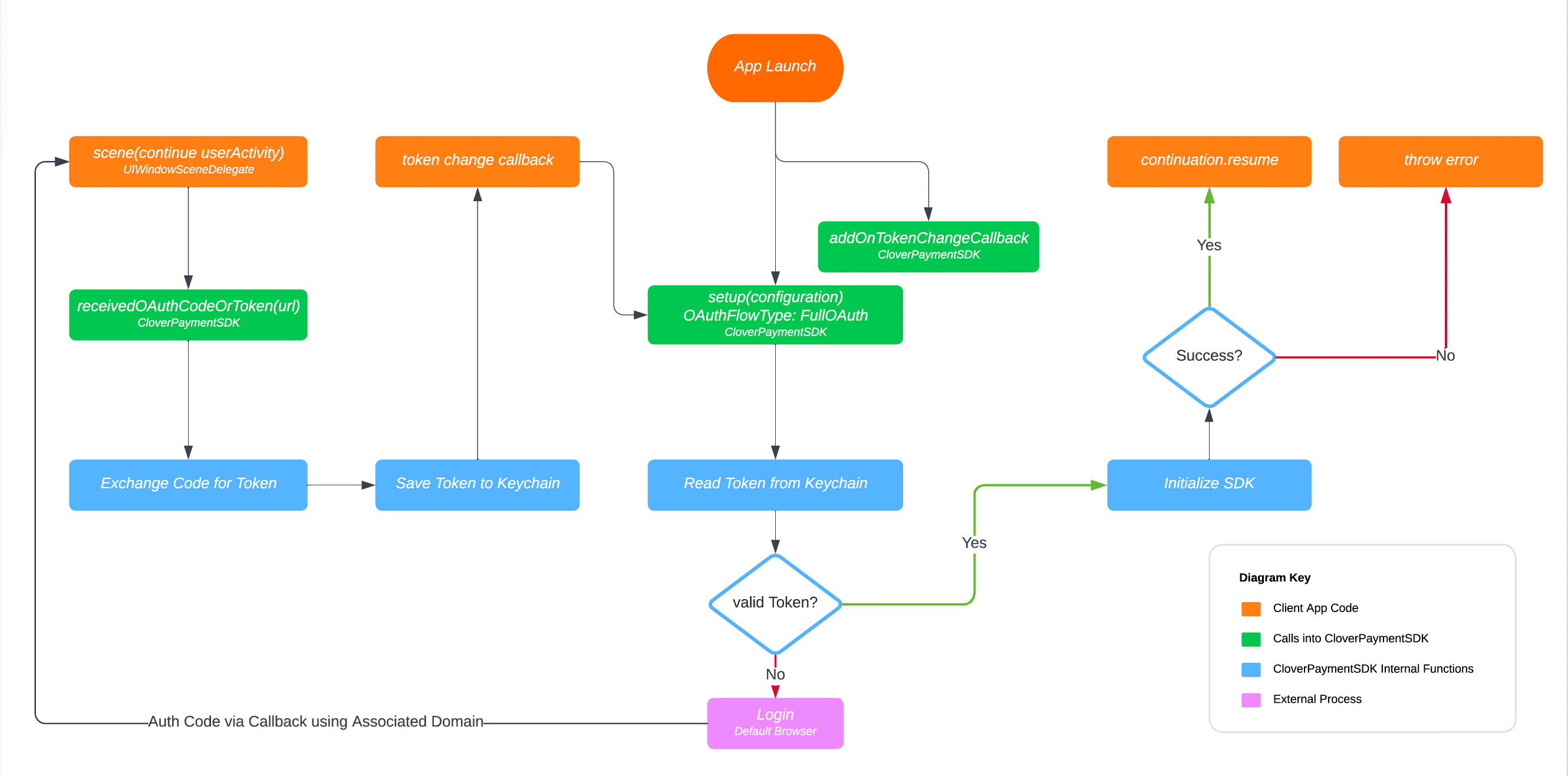
iOS—Full OAuth flow
Related topics
Updated 7 months ago