

Initiate v2/OAuth flow from the Clover App Market
Sandbox and production environment URLs
Clover sandbox and production environments use different URLs. The following table lists which URL to use for OAuth requests in each environment.
| Request path | Sandbox URL | Production URL North America | Production URL Europe | Production URL Latin America |
|---|---|---|---|---|
| /oauth/v2/authorize | sandbox.dev.clover.com | www.clover.com | www.eu.clover.com | www.la.clover.com |
| /oauth/v2/token | apisandbox.dev.clover.com | api.clover.com | api.eu.clover.com | api.la.clover.com |
| /oauth/v2/refresh | apisandbox.dev.clover.com | api.clover.com | api.eu.clover.com | api.la.clover.com |
| /oauth/token/migrate_v2 | apisandbox.dev.clover.com | api.clover.com | api.eu.clover.com | api.la.clover.com |
Complete v2/OAuth flow initiated from the Clover App Market
Prerequisite
From October 2023, Clover requires apps to use the v2/OAuth flow. The merchant must install or connect to your app so that your app can initiate the v2/OAuth flow.
v2/OAuth flow
The Clover v2/OAuth lets your app have full control of the OAuth flow as follows:
- Merchant selects the installed app from the:
- Clover App Market.
- Merchant Dashboard > More Tools > Clover App Market page.
- Clover redirects the merchant to your app’s main access link or site URL with a merchantId.
- App calls the
/v2/authorizeendpoint to initiate the OAuth flow. See Generate a v2/OAuth token.
The v2/OAuth flow takes into account both high-trust and low-trust apps, as seen in the following diagram:
- High-trust apps exchange an authorization code for an
access_token. After the redirect URL returns the merchant to the app, the app receives the authorization code from the URL and uses it to request anaccess_token. - Low-trust apps use the authorization code flow with a proof key for code exchange (PKCE).
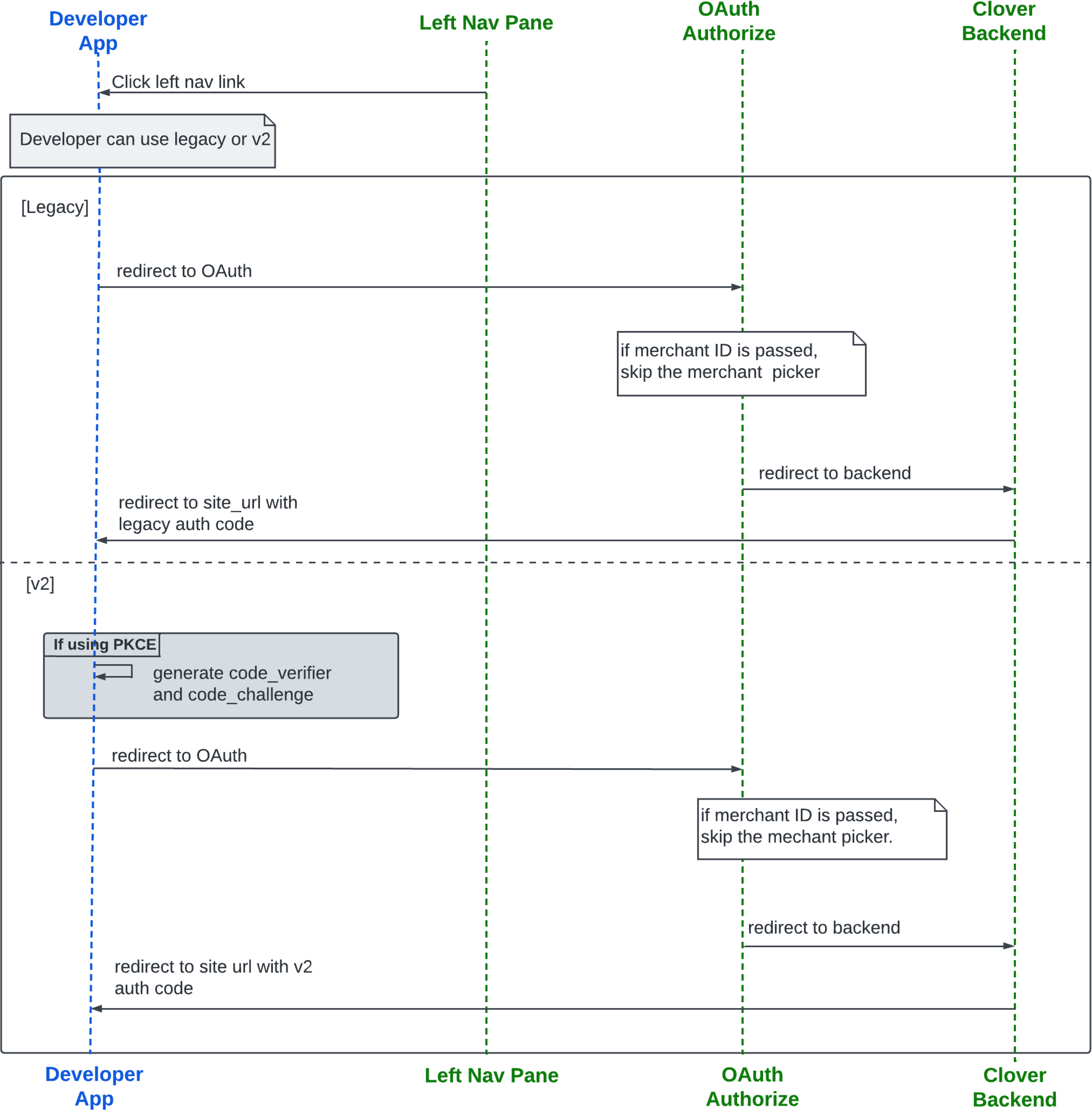
Left navigation menu v2 OAuth flow starting with the app
Set and use the Alternate Launch Path for apps
Link (URL) path for your app that you enter on the Edit REST Configuration page for web apps. It must use the same base domain as your Site URL.
For a consistent and reliable merchant experience, you must set an Alternate Launch Path for your Clover app. This path is required in all scenarios for initiating OAuth:
- Launching the app from the Merchant Dashboard left navigation menu
- Installing and connecting to the app from the Clover App Market
- Initiating OAuth flows from an external web app
When the Alternate Launch Path is configured, Clover can correctly redirect merchants to install or connect the app if it is not already installed. When Clover redirects merchants to this path, your app must initiate the OAuth flow by calling the /v2/authorize endpoint to ensure a seamless launch experience.
[For Reference only] Partial (legacy) OAuth flow
Prior to the implementation of the Clover v2/OAuth flow, when a merchant installed or connected to an app from the Merchant Dashboard > More Tools > Clover App Market page or directly from the Clover App Market, Clover redirected the merchant through a partial OAuth flow.
The partial OAuth flow bypasses the /oauth/authorize endpoint, goes directly to /oauth/merchants/{merchantID}, and then redirects to the app’s main access link or site URL with an authorization code or auth_code. This skips the initial step of the OAuth flow, as seen in the following diagram:
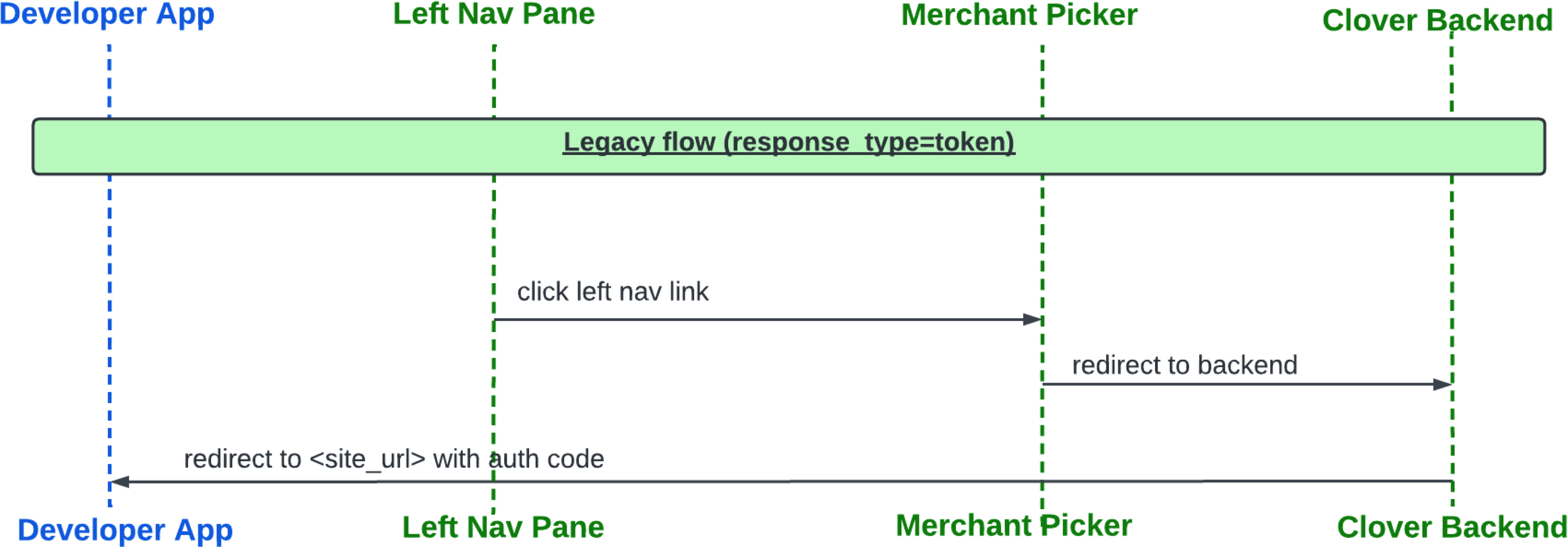
Legacy flow from Merchant Dashboard left navigation menu
Related topics
Updated 4 months ago