

High-trust apps—Auth code flow
Use the standard auth code flow to generate auth tokens using the Client Secret
High-trust apps securely store and use the Client Secret (app_secret), as shown in the diagram:
Auth code flow for high-trust apps
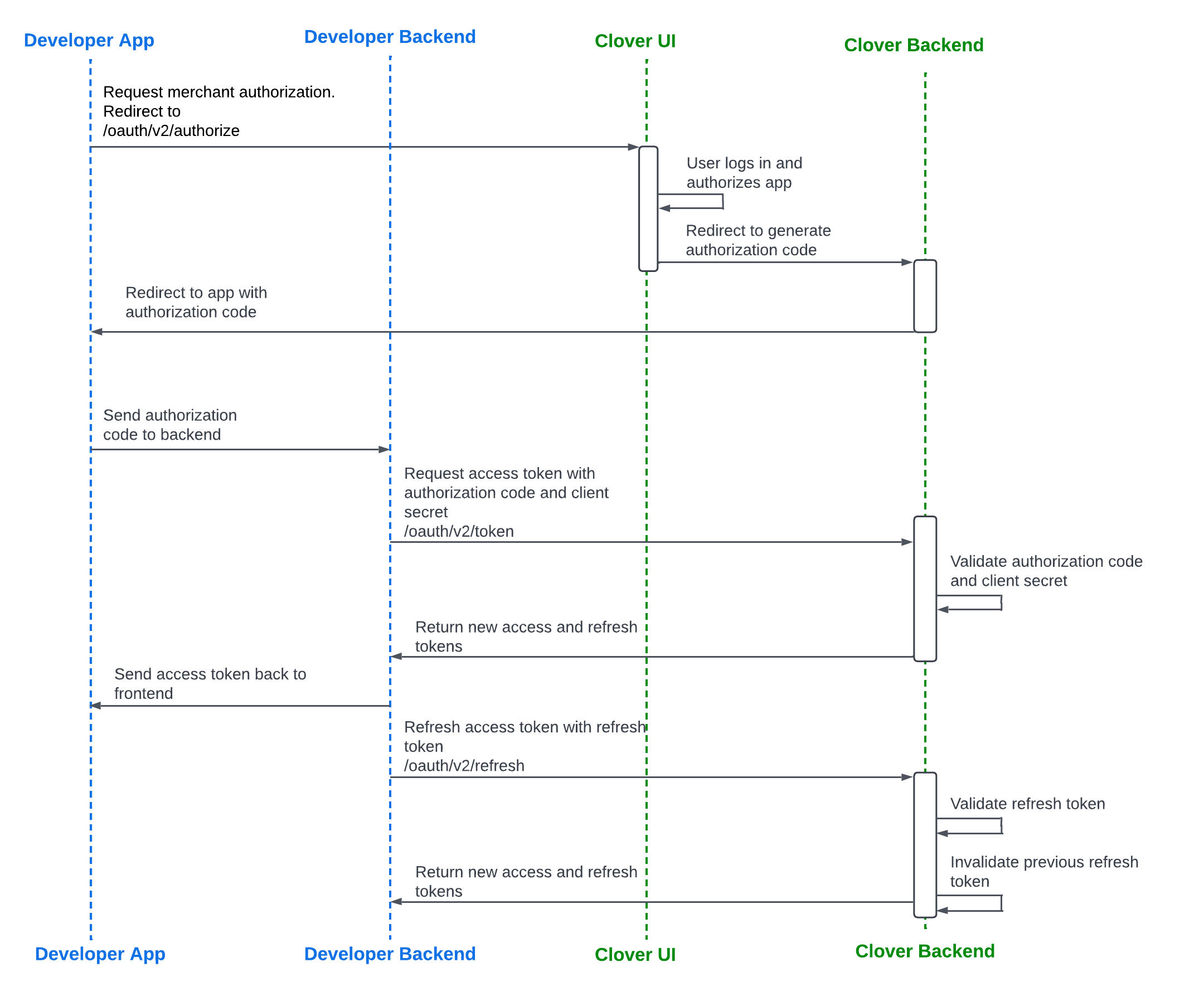
Auth code flow for high-trust apps
Recovery token flow for high-trust apps
Tutorial: Reauthenticate with a recovery token.
Recovery token is valid for up to 2 weeks onlyA recovery token associated with a current
refresh_tokenremains valid for up to 2 weeks or until therefresh_tokenis successfully used. Once therefresh_tokenis used, it is no longer considered lost, and the associated recovery token becomes invalid.After the 2-week period from when the current
refresh_tokenwas generated, the only way to reauthenticate the app is by completing the OAuth flow again.
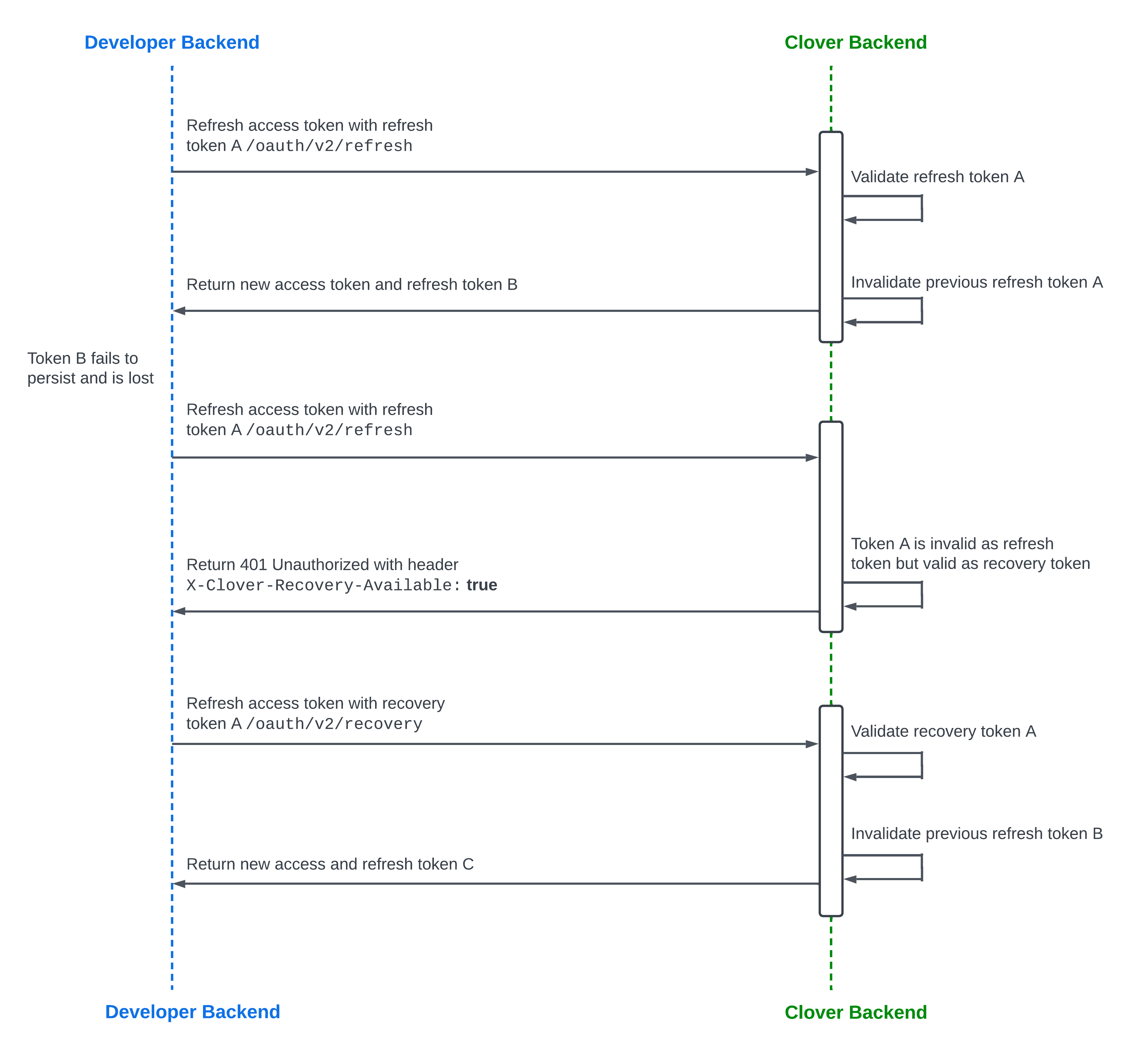
Recovery token flow for high-trust apps
Sandbox and production environment URLs
Clover sandbox and production environments use different URLs. The following table lists which URL to use for OAuth requests in each environment.
| Request path | Sandbox URL | Production URL North America | Production URL Europe | Production URL Latin America |
|---|---|---|---|---|
| /oauth/v2/authorize | sandbox.dev.clover.com | www.clover.com | www.eu.clover.com | www.la.clover.com |
| /oauth/v2/token | apisandbox.dev.clover.com | api.clover.com | api.eu.clover.com | api.la.clover.com |
| /oauth/v2/refresh | apisandbox.dev.clover.com | api.clover.com | api.eu.clover.com | api.la.clover.com |
| /oauth/v2/recovery | apisandbox.dev.clover.com | api.clover.com | api.eu.clover.com | api.la.clover.com |
| /oauth/token/migrate_v2 | apisandbox.dev.clover.com | api.clover.com | api.eu.clover.com | api.la.clover.com |
Generate an access and refresh token pair
Before you begin
See the OAuth terminology section to understand the key terms.
Prerequisites
This section contains steps for the global developer platform. If you are creating apps for merchants in Europe or LATAM—Argentina, complete the steps to create a sandbox developer account.
To generate an expiring OAuth API token, complete the following:
- Create a global developer account.
- Manage test merchant accounts and information.
- Create your app in the sandbox environment.
- Configure settings and permissions that your app requires to access Clover merchant data.
- Required for the v2/OAuth flow—Set the Alternate Launch Path to redirect merchants to install and launch your app from the Clover App Market. See Set app link (URL) and CORS domain.
Step 1: Request merchant authorization
The merchant needs to log into the Clover Merchant Dashboard and install the developer's app from the Clover App Market. By installing the app, the merchant authorizes it to access the merchant's information that the app requires.
When an unauthorized merchant installs your app from the Clover App Market, they are redirected to log in to their Clover merchant account and then back to your app.
- From your app, send a GET request to the
/oauth/v2/authorizeendpoint. - Include the query parameters:
client_idandclient_redirect_URL.
https://sandbox.dev.clover.com/oauth/v2/authorize?client_id={APP_ID}&redirect_uri={CLIENT_REDIRECT_URL}Step 2: Receive an authorization code
Once a merchant is authorized, the Clover server redirects merchants to your app with an authorization code.
https://www.example.com/oauth_callback?merchant_id={MERCHANT_ID}&client_id={APP_ID}&code={AUTHORIZATION_CODE}With the authorization code, the Clover server confirms that the merchant authorizes your request for merchant data. Use this code to further negotiate with the Clover server for an expiring OAuth token. Every time a merchant is redirected to your app, you can confirm whether the merchant has logged in to their Clover merchant account by checking for an authorization code in the redirect URL.
Step 3: Request and receive an access_token and refresh_token pair
access_token and refresh_token pairTo exchange the authorization code for an expiring OAuth token:
- From your app, send a POST request to the
/oauth/v2/tokenendpoint. - Include the query parameters:
client_id,client_secret, andcode. - Optional—If you do not need a refresh token, set the query parameter
no_refresh_tokento true in the request:/oauth/v2/token?no_refresh_token=**true**. See Bypass refresh token creation in the OAuth flow.
When the Clover server responds to the request, retrieve the expiring OAuth token from your app server. The response body indicates when the access and refresh tokens expire, and the expiration dates are represented as Unix timestamps.
Request and Response example—Expiring OAuth token
{
  "client_id": "{APP_ID}",
  "client_secret": "{APP_SECRET}",
  "code": "{AUTHORIZATION_CODE}"
}
{
"access_token": "{ACCESS_TOKEN}",
"access_token_expiration": 1677875430,
"refresh_token": "{REFRESH_TOKEN}",
"refresh_token_expiration": 1709497830
}Related topics
Updated 4 months ago